

AI Image Combiner — Blend Multiple Photos Into One
The AI Image Combiner turns two to six source photos into one cohesive picture. Upload on this page, pick a style or write a prompt, and generate a result with unified light, scale, and viewpoint.
Unlike a collage grid, this online tool rebuilds a single photograph so people, products, and backgrounds look like they were shot together. The workbench, preview, and download all stay on the same URL.
Sign in to combine your images
Sign in to generate and manage your credits
Output image
Merge Photos

Add a photo to get started.
Real AI result
AI Image Combiner example: two portraits, one street photo
This example used Put Two People Together — two solo portraits blended with matched golden-hour lighting on a city street.
Input images

Photo 1

Photo 2
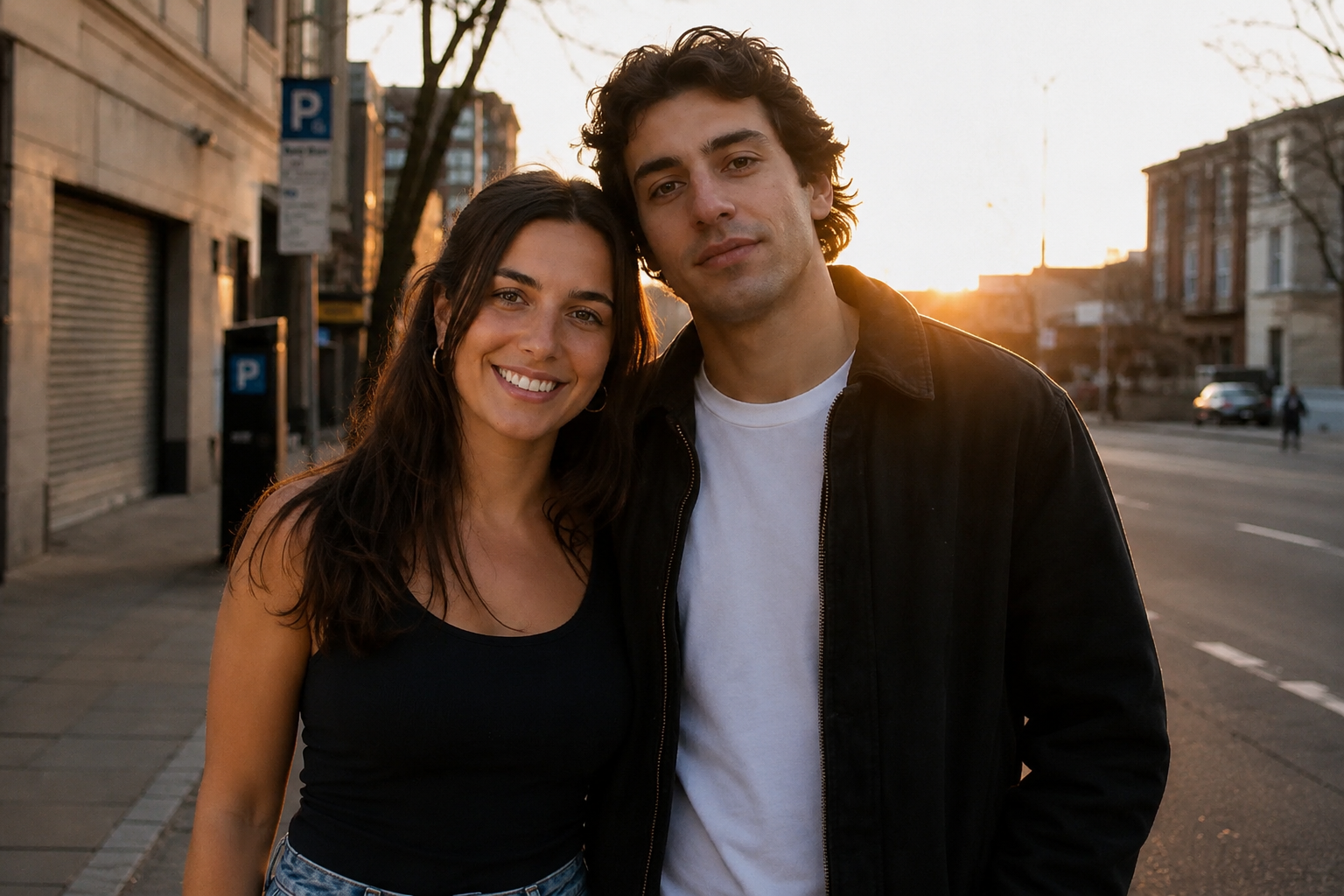
Generated from the two sample photos above with the Put Two People Together template. Lighting, shadows, and perspective are matched automatically.
How to Use the AI Image Combiner in 3 Steps
Upload Your Photos
Add two to six JPG, PNG, or WEBP files. The first image usually anchors the scene; later files supply people, products, or a style reference. Drag them in, tap to browse, or load a sample set if you want to test the pipeline before using your own shots.
Choose a Style or Write a Prompt
Pick Couple Photo, Family Portrait, Put Two People Together, product staging, or another template. Each template is a ready-made prompt you can edit. Describe who stands where, the time of day, and the mood — that text is what the model follows when it rebuilds the frame.
Generate and Download
Run the job on this page, wait about 20–60 seconds, then review lighting and edges in the preview. Download a PNG when the blend looks like one photograph rather than a pasted collage. Sign in so credits can be applied to the generation.
What the AI Image Combiner Can Do
Natural blending, not a collage grid
The model reads faces, bodies, products, and backgrounds, then paints one photograph where subjects share a room, street, or set. You are not dropping rectangles into a template. Hairlines, hands, and overlapping shoulders are part of the same pass.
Lighting, scale, and perspective matched
Output aims for one light source, aligned vanishing lines, corrected height between people, and a shared color grade. That is the difference between a merge that looks shot in-camera and a pair of cutouts sitting on a background.
Style templates for common merge jobs
Couple photos, family portraits, add a person to a group, side-by-side layouts, face merge, style transfer, product staging, and interior staging ship as starting prompts. Adjust the wording when the default scene is close but not exact.
Credit-based generation in the browser
See the credit cost on the generate button before you run. There is no desktop plugin. Paid exports are clean PNG files you can post, print, or hand to a designer — as long as you own the photos you uploaded.
How the AI Image Combiner blends photos into one scene
An AI image combiner is not a layout tool that tiles pictures. It interprets each source, then generates a new frame where the subjects, environment, and visual language belong together. Use the AI Image Combiner when you need one photograph that never existed — two portraits on the same street, a relative added to a family shot, a packshot placed in a lifestyle set — rather than a contact sheet of crops. The notes below cover what to upload, how prompts steer the blend, and how to judge whether the result will hold on a feed, a print, or a product page.
What to upload so the blend holds
Clear subjects beat busy snapshots. A usable source has one main person, product, or room, shot in even light, with enough pixels that faces and logos stay sharp after the merge. Window light or shade outdoors usually beats mixed restaurant lamps and a harsh on-camera flash. Group photos where two people already overlap, heavy motion blur, and tiny faces in a wide landscape are the usual reasons a merge looks chewed. Phone portraits, pack shots on a table, and a separate background plate work well. JPG, PNG, and WEBP up to 10MB each are accepted, up to six files per job. If you only want to see the pipeline, load a sample set on this page — those files were chosen because each subject is readable on its own.
How prompts and templates steer the merge
The style you tap is a starting sentence, not a locked look. Couple Photo, Family Portrait, and Put Two People Together bias the model toward a shared pose and matched skin lighting. Product staging and interior staging treat the first image as the hero object or room. Style transfer uses a later image as the look, not as another person to insert. After you pick a template, edit the prompt: say who stands on the left, whether it is golden hour or overcast, and whether you want a cinematic still or a casual snapshot. Vague text such as “make it nice” leaves the model guessing. Specific blocking and light direction are what this page actually follows.
Collage makers versus a true photo merge
A collage maker places images next to each other in a grid, with hard borders or a scrapbook frame. That is useful for moodboards and comparison slides. This tool is for a different job: one coherent photograph. People should share the same shadows, horizon, and color temperature. If you truly need a labeled grid, use the Side by Side style instead of forcing a cinematic prompt. Mixing both intents in one run — “make a collage that also looks like one photo” — usually fails both. Pick the output you will publish, then write the prompt for that output only.
How to spot a weak blend before you download
Zoom the preview to hairlines, glasses, jewelry, shoe soles, and the ground where people stand. A clean merge keeps those details instead of a plastic halo or a floating foot. Mismatched sun direction — one face in warm dusk, another in cool noon — is the fastest tell that the sources fought each other. Try sources with similar time of day, or say in the prompt which light should win. Scale errors show up as a child taller than an adult or a product that dwarfs the table. If the silhouette is wrong, do not download and patch it in another app first. Swap a sharper source, tighten the prompt, or try a different template, then generate again.
Credits, rights, and what this page is not
Generations use credits shown on the button. Sign in to run a job and to choose the download that matches your plan. You must own the rights to every photo you upload; a merge does not grant you a license to someone else’s portrait. This editor does not replace a missing face from memory, does not cut a subject onto a transparent layer by itself, and does not write a video from the still. For a cutout, use a background-removal tool. For a still you have not shot, use the image generator. Related links on this page stay inside photo-merge and cleanup so you can finish the job without jumping into an unrelated video studio.
Background reading: Image editing (Wikipedia)
Who uses the AI Image Combiner
Families apart and group portraits
Put relatives from different years or cities into one sitting. This workflow is for the portrait that logistics never allowed — not for inventing a person who was never photographed. Use similar head sizes and front-facing shots when you can.
Couples and memory keepers
Merge two solo portraits into the photo that was never taken on the same trip. Put Two People Together and Couple Photo templates bias toward shared light and a believable stance on one street or interior.
Travelers and the missing photographer
Add the friend who held the camera back into the group. Works best when the extra person is a clear portrait and the group shot has space to stand, not a packed crowd with no ground plane.
Sellers, designers, and style tests
Stage a packshot into a lifestyle scene, drop furniture into a room plate, or fuse a style reference with a product. Designers use the same online combiner as a direction still before a photoshoot, not as a replacement for licensed pack photography when a retailer requires it.
AI Image Combiner FAQ
Related Tools
Blend your photos with the AI Image Combiner
Upload two to six images on this page, pick a style, and generate a single photograph with matched light and perspective.