

AI 画像結合器 — 最大 6 枚の写真をブレンド
AI 画像コンバイナー: 統一された照明、視点、シーンの方向を使用して、最大 6 つの画像を 1 つのまとまりのある AI コンポジションに結合します。
コラージュグリッドとは異なり、このオンラインツールは単一の写真を再構築するため、人物、製品、背景が一緒に撮影されたように見えます。ワークベンチ、プレビュー、ダウンロードはすべて同じURLに留まります。
サインインして画像を結合します
サインインしてクレジットを生成および管理します
出力画像
写真を結合する

始めるには写真を追加してください。
実際のAI結果
2 枚の別々の写真が 1 枚の自然なショットに結合されました
この例では、Put Two People Together スタイルを使用しました。2 人のソロ ポートレートを、街路上で一致するゴールデンアワーの照明とブレンドしました。
入力画像

写真1

写真2
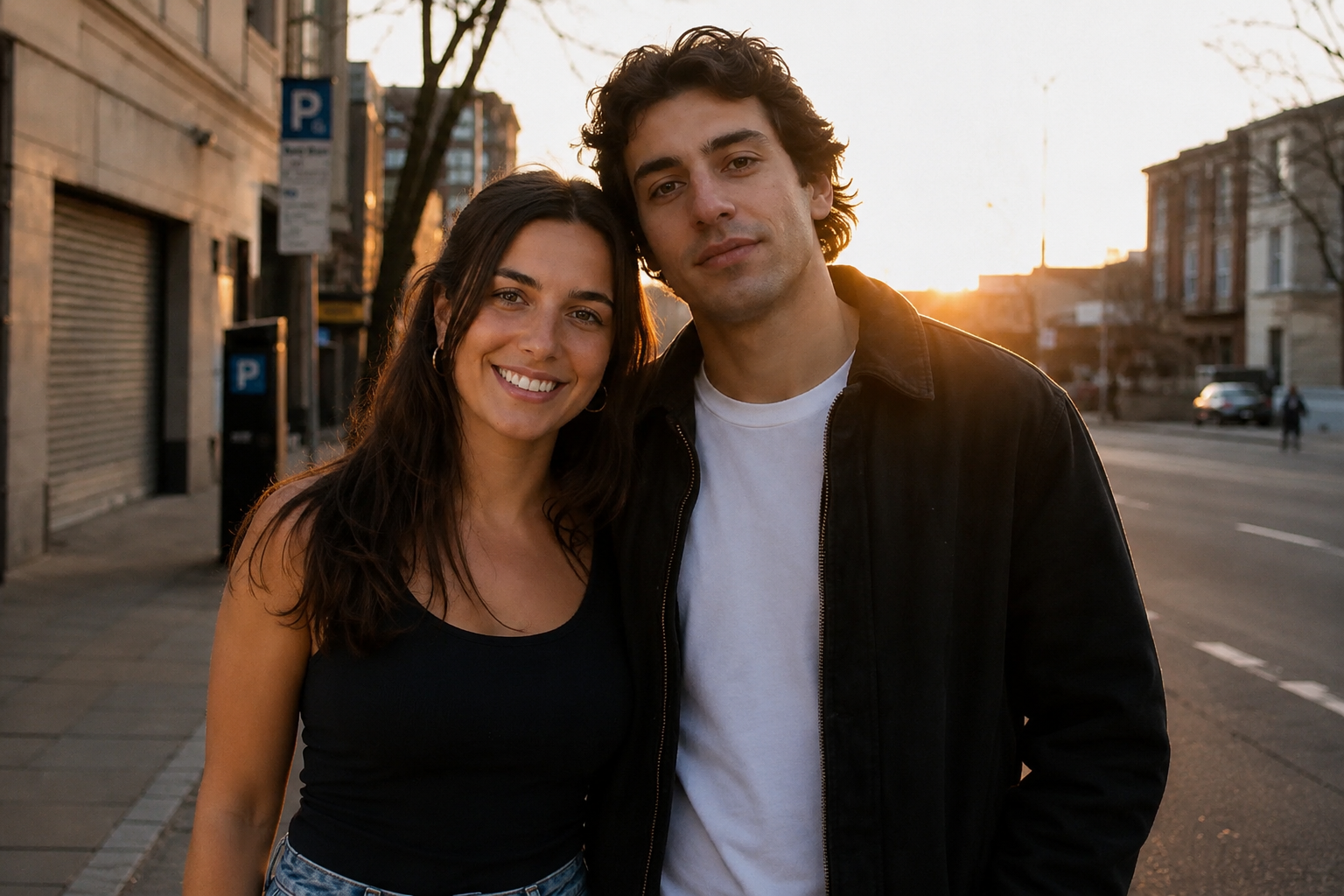
「Put Two People Together」テンプレートを使用して、上の 2 つのサンプル写真から生成されました。照明、影、遠近感は自動的に調整されます。
3 ステップで AI Image Combiner を使用する方法
写真をアップロードする
最大 6 つの画像を追加します。最初の画像はシーンを固定します。クリック、ドラッグ、またはカメラロールから選択します。
スタイルを選択するか、プロンプトを作成します
カップルの写真や家族のポートレートなどのテンプレートを選択するか、希望するシーンを正確に説明します。プロンプトが全体のブレンドを決定します。
生成してダウンロード
コンポジションを生成し、結果を確認し、プロジェクト用のきれいな PNG をダウンロードします。
AI Image Combiner が行うすべての機能
ナチュラルブレンド
AI は顔、身体、製品、背景を読み取り、コラージュ グリッドではなく、被写体がシーンを共有する 1 枚の写真を描きます。
照明と視点の一致
出力は 1 つの光源、調整された遠近法、修正されたスケール、および統一された色を共有します。
スタイルテンプレート
カップルの写真、家族のポートレート、グループへの人物の追加、製品のステージング、スタイルの転送など — 1 つを選択し、文言を調整します。
クレジットベースの生成
クレジットを使用して生成し、ワークフローに合ったダウンロード オプションを選択します。
AI画像コンバイナーが写真を1つのシーンにブレンドする方法
AI画像コンバイナーは、写真をタイル状に配置するレイアウトツールではありません。各ソースを解釈し、被写体、環境、ビジュアル言語が調和する新しいフレームを生成します。AI画像コンバイナーは、存在しなかった1枚の写真が必要な場合(同じ通りに2人のポートレート、家族写真に追加された親戚、ライフスタイルセットに配置されたパックショット)に使用し、クロップのコンタクトシートではありません。以下のノートには、アップロードするもの、プロンプトがブレンドをどのように誘導するか、結果がフィード、プリント、または製品ページでどのように表示されるかを判断する方法が記載されています。
ブレンドがうまくいくようにアップロードするもの
主題がはっきりした写真は、ごちゃごちゃしたスナップショットより優れています。利用可能なソースとは、顔やロゴがマージ後も鮮明に保たれるのに十分なピクセル数で、均一な光で撮影された、1人の主な人物、製品、または部屋を指します。屋外の木陰や窓からの光は、通常、レストランのミックスされた照明や、カメラに直接当たる強いフラッシュよりも優れています。人物がすでに重なっている集合写真、激しいモーションブラー、広い風景の中に小さく写る顔は、マージが粗く見える一般的な理由です。スマートフォンのポートレート、テーブル上の商品写真、独立した背景プレートはうまく機能します。JPG、PNG、WEBP形式で、各10MBまで、ジョブごとに最大6ファイルまで受け付けます。パイプラインのみを確認したい場合は、このページでサンプルセットを読み込んでください。これらのファイルは、各被写体が単独で認識できるため選択されました。
プロンプトとテンプレートがマージをどのように指示するか
選択したスタイルは、固定された見た目ではなく、開始の言葉です。「カップル写真」「家族写真」「二人を一緒に配置」は、モデルを共有ポーズと統一された肌のライティングに偏らせます。商品撮影やインテリア撮影では、最初の画像をメインのオブジェクトまたは部屋として扱います。スタイル転送では、後の画像を参照として使用し、挿入する別の人物としては扱いません。テンプレートを選択した後、プロンプトを編集します。誰が左に立つか、ゴールデンアワーか曇りか、シネマティックなスチルかカジュアルなスナップショットかなどを指定します。「きれいにしてください」のような曖昧なテキストは、モデルを推測させます。具体的な配置や光の方向が、このページが実際に従うものです。
コラージュメーカーと真の写真マージの違い
コラージュメーカーは、画像をグリッド状に配置し、境界線やスクラップブック風のフレームを付けます。これは、ムードボードや比較スライドに便利です。このツールは別の目的のためです。つまり、1つのまとまった写真を作成することです。人物は同じ影、地平線、色温度を共有する必要があります。ラベル付きグリッドが本当に必要な場合は、シネマティックなプロンプトを強制するのではなく、「サイドバイサイド」スタイルを使用してください。両方の意図を1回の実行で混在させる(「コラージュを作成し、かつ1枚の写真のように見せる」)ことは、通常、どちらも失敗します。公開する出力形式を選択し、その出力形式専用のプロンプトを作成してください。
ダウンロード前に弱いブレを見分ける方法
プレビューを髪の毛、眼鏡、ジュエリー、靴底、人物が立っている地面まで拡大してください。クリーンなマージは、プラスチックのような光輪や浮いた足ではなく、これらのディテールを保持します。太陽の方向の不一致(片方の顔は暖かい夕暮れ、もう片方は涼しい正午)は、ソースが互いに干渉したことを示す最も速い兆候です。同じ時間帯のソースを試すか、プロンプトでどちらの光を優先するかを指定してください。スケールのエラーは、子供が大人の身長よりも高かったり、製品がテーブルを圧倒したりする場合に現れます。シルエットが間違っている場合は、ダウンロードして別のアプリで修正する前に、まずソースをシャープなものに交換するか、プロンプトを絞るか、別のテンプレートを試してから再生成してください。
クレジット、権利、およびこのページができないこと
生成にはボタンに表示されるクレジットが使用されます。ジョブを実行し、プランに合ったダウンロードを選択するにはサインインしてください。アップロードするすべての写真に対する権利をあなたが所有している必要があります。マージは、他人の肖像権の使用許諾を与えるものではありません。このエディターは、記憶から欠落した顔を置き換えたり、被写体を透明なレイヤーに単独で切り抜いたり、静止画からビデオを作成したりするものではありません。切り抜きには、背景除去ツールを使用してください。撮影していない静止画には、画像ジェネレーターを使用してください。このページにある関連リンクは、写真のマージとクリーンアップの範囲内に留まるため、無関係なビデオスタジオに移動することなくジョブを完了できます。
背景資料: 画像編集 (Wikipedia)
AI画像コンバイナーを使用するのは誰か
離れて暮らす家族と集合写真
異なる年や都市の親戚を1枚の写真にまとめます。このワークフローは、ロジスティクス上の理由で実現できなかったポートレートのためのものであり、撮影されたことのない人物を創作するためのものではありません。可能な限り、顔の大きさが似ていて正面を向いたショットを使用してください。
カップルと思い出の記録者
2つのソロポートレートを、同じ旅行で撮影されなかった写真にマージします。「二人を一緒に配置」および「カップル写真」テンプレートは、共有された光と、1つの通りまたは室内でのありそうなポーズに偏ります。
旅行者と不在のカメラマン
カメラを持っていた友人をグループ写真に追加します。追加の人物がはっきりしたポートレートであり、グループショットに、詰め込まれた群衆ではなく、立つスペースがある場合に最も効果的です。
販売者、デザイナー、スタイルテスト
商品写真をライフスタイルシーンに配置したり、家具を部屋のプレートに配置したり、スタイル参照を製品と融合させたりします。デザイナーは、小売業者が要求する場合の正規の商品写真の代替としてではなく、撮影前の指示スチルとして、同じオンラインコンバイナーを使用します。